'type' = 'cat' in Linux
'find' and 'findstr' = 'grep' in Linux
'NUL' = '$null' in PowerShell (PS) = '/dev/null' in Linux
2019年3月27日 星期三

2019年3月10日 星期日
Enable shared folder for VirtualBox VM
Source https://blog.gtwang.org/tips/virtualbox-shared-folder/
STEP 2
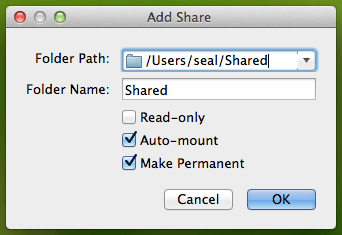
設定要分享的資料夾路徑與名稱,另外把「Auto-mount」與「Make Permanent」兩個選項也勾起來,
STEP 1
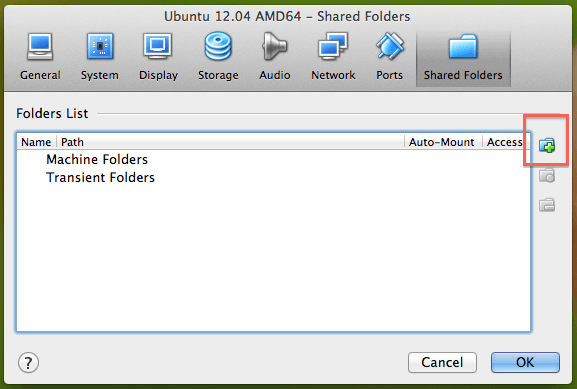
首先設定 Host OS 中 VirtualBox 的分享資料夾,從「Device」選單中開啟「Shared Folders」設定視窗。
首先設定 Host OS 中 VirtualBox 的分享資料夾,從「Device」選單中開啟「Shared Folders」設定視窗。
VirtualBox 的分享資料夾功能選單
點選右方的「Add Shared Folder」圖示。
STEP 2
設定要分享的資料夾路徑與名稱,另外把「Auto-mount」與「Make Permanent」兩個選項也勾起來,
新增 VirtualBox 的分享資料夾
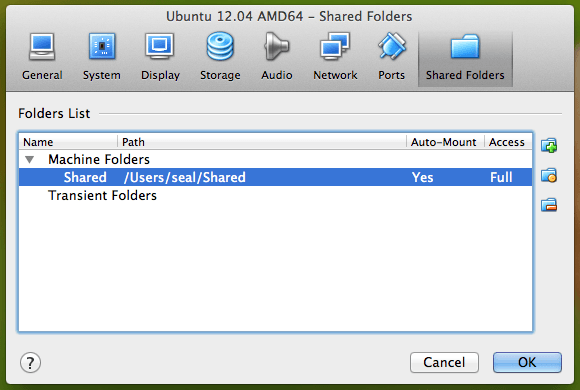
然後按下「OK」。
這樣在 Host OS 中 VirtualBox 這邊的設定就完成了,接下來是 Guest OS 中的設定。
STEP 3
在 Linux 中(在 Guest OS 中)修改 /etc/group,將所有需要用到分享資料夾的帳號加入 vboxsf 群組。
在 Linux 中(在 Guest OS 中)修改 /etc/group,將所有需要用到分享資料夾的帳號加入 vboxsf 群組。
首先找尋「vboxsf」這個群組,正常來說應該會像這樣:
vboxsf:x:125:
接著把所有需要用到分享資料夾的帳號加進去,例如將 seal 這個帳號加入 vboxsf 群組:
vboxsf:x:125:seal
也就是把帳號名稱加在最後一個冒號之後,如果要加入多個帳號,就用豆點分隔。
STEP 4
登出虛擬機器的 Linux,重新登入。
登出虛擬機器的 Linux,重新登入。
2019年3月6日 星期三
How to get the application exit code ?
Source https://stackoverflow.com/questions/334879/how-do-i-get-the-application-exit-code-from-a-windows-command-line
BASH
BASH
echo $?
Windows
echo Exit Code is %errorlevel%
@echo off
my_nify_exe.exe
if errorlevel 1 (
   echo Failure Reason Given is %errorlevel%
   exit /b %errorlevel%
)How to disable kernel logs from printing on the console?
Source https://stackoverflow.com/questions/334879/how-do-i-get-the-application-exit-code-from-a-windows-command-line
sudo dmesg -n 1
sudo dmesg -n 1
Access memory-mapped registers in Linux kernel space.
Source https://stackoverflow.com/questions/16935041/how-to-write-register-from-linux-kernel-module-cpu-arm
void __iomem *io = ioremap(REGBASE, SZ_4K);
writel(0x00000002, io + 0x0004);How to split a shell command over multiple lines (when using an IF statement) ?
Source https://stackoverflow.com/questions/18599711/how-can-i-split-a-shell-command-over-multiple-lines-when-using-an-if-statement
$ cat test.sh
if ! fab --fabfile=.deploy/fabfile.py \
   --forward-agent \
   --disable-known-hosts deploy:$target; then
     echo failed
else
     echo succeeded
fi

$ alias fab=true; . ./test.sh
succeeded
$ alias fab=false; . ./test.sh
failed“error: branch '.*' not found when removing a branch is attempted.
find .git//refs -name -delete
In case of it is repository hosted by repo,
find .repo//refs -name -delete
In case of it is repository hosted by repo,
find .repo/
訂閱:
文章 (Atom)