2019年7月29日 星期一

Linux C programming guide.


(https://www.gnu.org/software/libc/manual/html_node/Error-Codes.html)
2.2 Error Codes 

The error code macros are defined in the header file errno.h. All of them expand into integer constant values. Some of these error codes can’t occur on GNU systems, but they can occur using the GNU C Library on other systems.
Macro: int EPERM
“Operation not permitted.” Only the owner of the file (or other resource) or processes with special privileges can perform the operation.
Macro: int ENOENT
“No such file or directory.” This is a “file doesn’t exist” error for ordinary files that are referenced in contexts where they are expected to already exist.
Macro: int ESRCH
“No such process.” No process matches the specified process ID.
Macro: int EINTR
“Interrupted system call.” An asynchronous signal occurred and prevented completion of the call. When this happens, you should try the call again.
You can choose to have functions resume after a signal that is handled, rather than failing with EINTR; see Interrupted Primitives.
Macro: int EIO
“Input/output error.” Usually used for physical read or write errors.
Macro: int ENXIO
“No such device or address.” The system tried to use the device represented by a file you specified, and it couldn’t find the device. This can mean that the device file was installed incorrectly, or that the physical device is missing or not correctly attached to the computer.
Macro: int E2BIG
“Argument list too long.” Used when the arguments passed to a new program being executed with one of the exec functions (see Executing a File) occupy too much memory space. This condition never arises on GNU/Hurd systems.
Macro: int ENOEXEC
“Exec format error.” Invalid executable file format. This condition is detected by the exec functions; see Executing a File.
Macro: int EBADF
“Bad file descriptor.” For example, I/O on a descriptor that has been closed or reading from a descriptor open only for writing (or vice versa).
Macro: int ECHILD
“No child processes.” This error happens on operations that are supposed to manipulate child processes, when there aren’t any processes to manipulate.
Macro: int EDEADLK
“Resource deadlock avoided.” Allocating a system resource would have resulted in a deadlock situation. The system does not guarantee that it will notice all such situations. This error means you got lucky and the system noticed; it might just hang. See File Locks, for an example.
Macro: int ENOMEM
“Cannot allocate memory.” The system cannot allocate more virtual memory because its capacity is full.
Macro: int EACCES
“Permission denied.” The file permissions do not allow the attempted operation.
Macro: int EFAULT
“Bad address.” An invalid pointer was detected. On GNU/Hurd systems, this error never happens; you get a signal instead.
Macro: int ENOTBLK
“Block device required.” A file that isn’t a block special file was given in a situation that requires one. For example, trying to mount an ordinary file as a file system in Unix gives this error.
Macro: int EBUSY
“Device or resource busy.” A system resource that can’t be shared is already in use. For example, if you try to delete a file that is the root of a currently mounted filesystem, you get this error.
Macro: int EEXIST
“File exists.” An existing file was specified in a context where it only makes sense to specify a new file.
Macro: int EXDEV
“Invalid cross-device link.” An attempt to make an improper link across file systems was detected. This happens not only when you use link (see Hard Links) but also when you rename a file with rename (see Renaming Files).
Macro: int ENODEV
“No such device.” The wrong type of device was given to a function that expects a particular sort of device.
Macro: int ENOTDIR
“Not a directory.” A file that isn’t a directory was specified when a directory is required.
Macro: int EISDIR
“Is a directory.” You cannot open a directory for writing, or create or remove hard links to it.
Macro: int EINVAL
“Invalid argument.” This is used to indicate various kinds of problems with passing the wrong argument to a library function.
Macro: int EMFILE
“Too many open files.” The current process has too many files open and can’t open any more. Duplicate descriptors do count toward this limit.
In BSD and GNU, the number of open files is controlled by a resource limit that can usually be increased. If you get this error, you might want to increase the RLIMIT_NOFILE limit or make it unlimited; see Limits on Resources.
Macro: int ENFILE
“Too many open files in system.” There are too many distinct file openings in the entire system. Note that any number of linked channels count as just one file opening; see Linked Channels. This error never occurs on GNU/Hurd systems.
Macro: int ENOTTY
“Inappropriate ioctl for device.” Inappropriate I/O control operation, such as trying to set terminal modes on an ordinary file.
Macro: int ETXTBSY
“Text file busy.” An attempt to execute a file that is currently open for writing, or write to a file that is currently being executed. Often using a debugger to run a program is considered having it open for writing and will cause this error. (The name stands for “text file busy”.) This is not an error on GNU/Hurd systems; the text is copied as necessary.
Macro: int EFBIG
“File too large.” The size of a file would be larger than allowed by the system.
Macro: int ENOSPC
“No space left on device.” Write operation on a file failed because the disk is full.
Macro: int ESPIPE
“Illegal seek.” Invalid seek operation (such as on a pipe).
Macro: int EROFS
“Read-only file system.” An attempt was made to modify something on a read-only file system.
Macro: int EMLINK
“Too many links.” The link count of a single file would become too large. rename can cause this error if the file being renamed already has as many links as it can take (see Renaming Files).
Macro: int EPIPE
“Broken pipe.” There is no process reading from the other end of a pipe. Every library function that returns this error code also generates a SIGPIPE signal; this signal terminates the program if not handled or blocked. Thus, your program will never actually see EPIPE unless it has handled or blocked SIGPIPE.
Macro: int EDOM
“Numerical argument out of domain.” Used by mathematical functions when an argument value does not fall into the domain over which the function is defined.
Macro: int ERANGE
“Numerical result out of range.” Used by mathematical functions when the result value is not representable because of overflow or underflow.
Macro: int EAGAIN
“Resource temporarily unavailable.” The call might work if you try again later. The macro EWOULDBLOCK is another name for EAGAIN; they are always the same in the GNU C Library.
This error can happen in a few different situations:
  • An operation that would block was attempted on an object that has non-blocking mode selected. Trying the same operation again will block until some external condition makes it possible to read, write, or connect (whatever the operation). You can use select to find out when the operation will be possible; see Waiting for I/O.Portability Note: In many older Unix systems, this condition was indicated by EWOULDBLOCK, which was a distinct error code different from EAGAIN. To make your program portable, you should check for both codes and treat them the same.
  • A temporary resource shortage made an operation impossible. fork can return this error. It indicates that the shortage is expected to pass, so your program can try the call again later and it may succeed. It is probably a good idea to delay for a few seconds before trying it again, to allow time for other processes to release scarce resources. Such shortages are usually fairly serious and affect the whole system, so usually an interactive program should report the error to the user and return to its command loop.
Macro: int EWOULDBLOCK
“Operation would block.” In the GNU C Library, this is another name for EAGAIN (above). The values are always the same, on every operating system.
C libraries in many older Unix systems have EWOULDBLOCK as a separate error code.
Macro: int EINPROGRESS
“Operation now in progress.” An operation that cannot complete immediately was initiated on an object that has non-blocking mode selected. Some functions that must always block (such as connect; see Connecting) never return EAGAIN. Instead, they return EINPROGRESS to indicate that the operation has begun and will take some time. Attempts to manipulate the object before the call completes return EALREADY. You can use the select function to find out when the pending operation has completed; see Waiting for I/O.
Macro: int EALREADY
“Operation already in progress.” An operation is already in progress on an object that has non-blocking mode selected.
Macro: int ENOTSOCK
“Socket operation on non-socket.” A file that isn’t a socket was specified when a socket is required.
Macro: int EMSGSIZE
“Message too long.” The size of a message sent on a socket was larger than the supported maximum size.
Macro: int EPROTOTYPE
“Protocol wrong type for socket.” The socket type does not support the requested communications protocol.
Macro: int ENOPROTOOPT
“Protocol not available.” You specified a socket option that doesn’t make sense for the particular protocol being used by the socket. See Socket Options.
Macro: int EPROTONOSUPPORT
“Protocol not supported.” The socket domain does not support the requested communications protocol (perhaps because the requested protocol is completely invalid). See Creating a Socket.
Macro: int ESOCKTNOSUPPORT
“Socket type not supported.” The socket type is not supported.
Macro: int EOPNOTSUPP
“Operation not supported.” The operation you requested is not supported. Some socket functions don’t make sense for all types of sockets, and others may not be implemented for all communications protocols. On GNU/Hurd systems, this error can happen for many calls when the object does not support the particular operation; it is a generic indication that the server knows nothing to do for that call.
Macro: int EPFNOSUPPORT
“Protocol family not supported.” The socket communications protocol family you requested is not supported.
Macro: int EAFNOSUPPORT
“Address family not supported by protocol.” The address family specified for a socket is not supported; it is inconsistent with the protocol being used on the socket. See Sockets.
Macro: int EADDRINUSE
“Address already in use.” The requested socket address is already in use. See Socket Addresses.
Macro: int EADDRNOTAVAIL
“Cannot assign requested address.” The requested socket address is not available; for example, you tried to give a socket a name that doesn’t match the local host name. See Socket Addresses.
Macro: int ENETDOWN
“Network is down.” A socket operation failed because the network was down.
Macro: int ENETUNREACH
“Network is unreachable.” A socket operation failed because the subnet containing the remote host was unreachable.
Macro: int ENETRESET
“Network dropped connection on reset.” A network connection was reset because the remote host crashed.
Macro: int ECONNABORTED
“Software caused connection abort.” A network connection was aborted locally.
Macro: int ECONNRESET
“Connection reset by peer.” A network connection was closed for reasons outside the control of the local host, such as by the remote machine rebooting or an unrecoverable protocol violation.
Macro: int ENOBUFS
“No buffer space available.” The kernel’s buffers for I/O operations are all in use. In GNU, this error is always synonymous with ENOMEM; you may get one or the other from network operations.
Macro: int EISCONN
“Transport endpoint is already connected.” You tried to connect a socket that is already connected. See Connecting.
Macro: int ENOTCONN
“Transport endpoint is not connected.” The socket is not connected to anything. You get this error when you try to transmit data over a socket, without first specifying a destination for the data. For a connectionless socket (for datagram protocols, such as UDP), you get EDESTADDRREQ instead.
Macro: int EDESTADDRREQ
“Destination address required.” No default destination address was set for the socket. You get this error when you try to transmit data over a connectionless socket, without first specifying a destination for the data with connect.
Macro: int ESHUTDOWN
“Cannot send after transport endpoint shutdown.” The socket has already been shut down.
Macro: int ETOOMANYREFS
“Too many references: cannot splice.”
Macro: int ETIMEDOUT
“Connection timed out.” A socket operation with a specified timeout received no response during the timeout period.
Macro: int ECONNREFUSED
“Connection refused.” A remote host refused to allow the network connection (typically because it is not running the requested service).
Macro: int ELOOP
“Too many levels of symbolic links.” Too many levels of symbolic links were encountered in looking up a file name. This often indicates a cycle of symbolic links.
Macro: int ENAMETOOLONG
“File name too long.” Filename too long (longer than PATH_MAX; see Limits for Files) or host name too long (in gethostname or sethostname; see Host Identification).
Macro: int EHOSTDOWN
“Host is down.” The remote host for a requested network connection is down.
Macro: int EHOSTUNREACH
“No route to host.” The remote host for a requested network connection is not reachable.
Macro: int ENOTEMPTY
“Directory not empty.” Directory not empty, where an empty directory was expected. Typically, this error occurs when you are trying to delete a directory.
Macro: int EPROCLIM
“Too many processes.” This means that the per-user limit on new process would be exceeded by an attempted fork. See Limits on Resources, for details on the RLIMIT_NPROC limit.
Macro: int EUSERS
“Too many users.” The file quota system is confused because there are too many users.
Macro: int EDQUOT
“Disk quota exceeded.” The user’s disk quota was exceeded.
Macro: int ESTALE
“Stale file handle.” This indicates an internal confusion in the file system which is due to file system rearrangements on the server host for NFS file systems or corruption in other file systems. Repairing this condition usually requires unmounting, possibly repairing and remounting the file system.
Macro: int EREMOTE
“Object is remote.” An attempt was made to NFS-mount a remote file system with a file name that already specifies an NFS-mounted file. (This is an error on some operating systems, but we expect it to work properly on GNU/Hurd systems, making this error code impossible.)
Macro: int EBADRPC
“RPC struct is bad.”
Macro: int ERPCMISMATCH
“RPC version wrong.”
Macro: int EPROGUNAVAIL
“RPC program not available.”
Macro: int EPROGMISMATCH
“RPC program version wrong.”
Macro: int EPROCUNAVAIL
“RPC bad procedure for program.”
Macro: int ENOLCK
“No locks available.” This is used by the file locking facilities; see File Locks. This error is never generated by GNU/Hurd systems, but it can result from an operation to an NFS server running another operating system.
Macro: int EFTYPE
“Inappropriate file type or format.” The file was the wrong type for the operation, or a data file had the wrong format.
On some systems chmod returns this error if you try to set the sticky bit on a non-directory file; see Setting Permissions.
Macro: int EAUTH
“Authentication error.”
Macro: int ENEEDAUTH
“Need authenticator.”
Macro: int ENOSYS
“Function not implemented.” This indicates that the function called is not implemented at all, either in the C library itself or in the operating system. When you get this error, you can be sure that this particular function will always fail with ENOSYS unless you install a new version of the C library or the operating system.
Macro: int ENOTSUP
“Not supported.” A function returns this error when certain parameter values are valid, but the functionality they request is not available. This can mean that the function does not implement a particular command or option value or flag bit at all. For functions that operate on some object given in a parameter, such as a file descriptor or a port, it might instead mean that only that specific object (file descriptor, port, etc.) is unable to support the other parameters given; different file descriptors might support different ranges of parameter values.
If the entire function is not available at all in the implementation, it returns ENOSYS instead.
Macro: int EILSEQ
“Invalid or incomplete multibyte or wide character.” While decoding a multibyte character the function came along an invalid or an incomplete sequence of bytes or the given wide character is invalid.
Macro: int EBACKGROUND
“Inappropriate operation for background process.” On GNU/Hurd systems, servers supporting the term protocol return this error for certain operations when the caller is not in the foreground process group of the terminal. Users do not usually see this error because functions such as read and write translate it into a SIGTTIN or SIGTTOU signal. See Job Control, for information on process groups and these signals.
Macro: int EDIED
“Translator died.” On GNU/Hurd systems, opening a file returns this error when the file is translated by a program and the translator program dies while starting up, before it has connected to the file.
Macro: int ED
“?.” The experienced user will know what is wrong.
Macro: int EGREGIOUS
“You really blew it this time.” You did what?
Macro: int EIEIO
“Computer bought the farm.” Go home and have a glass of warm, dairy-fresh milk.
Macro: int EGRATUITOUS
“Gratuitous error.” This error code has no purpose.
Macro: int EBADMSG
“Bad message.”
Macro: int EIDRM
“Identifier removed.”
Macro: int EMULTIHOP
“Multihop attempted.”
Macro: int ENODATA
“No data available.”
Macro: int ENOLINK
“Link has been severed.”
Macro: int ENOMSG
“No message of desired type.”
Macro: int ENOSR
“Out of streams resources.”
Macro: int ENOSTR
“Device not a stream.”
Macro: int EOVERFLOW
“Value too large for defined data type.”
Macro: int EPROTO
“Protocol error.”
Macro: int ETIME
“Timer expired.”
Macro: int ECANCELED
“Operation canceled.” An asynchronous operation was canceled before it completed. See Asynchronous I/O. When you call aio_cancel, the normal result is for the operations affected to complete with this error; see Cancel AIO Operations.
Macro: int EOWNERDEAD
“Owner died.”
Macro: int ENOTRECOVERABLE
“State not recoverable.”
The following error codes are defined by the Linux/i386 kernel. They are not yet documented.
Macro: int ERESTART
“Interrupted system call should be restarted.”
Macro: int ECHRNG
“Channel number out of range.”
Macro: int EL2NSYNC
“Level 2 not synchronized.”
Macro: int EL3HLT
“Level 3 halted.”
Macro: int EL3RST
“Level 3 reset.”
Macro: int ELNRNG
“Link number out of range.”
Macro: int EUNATCH
“Protocol driver not attached.”
Macro: int ENOCSI
“No CSI structure available.”
Macro: int EL2HLT
“Level 2 halted.”
Macro: int EBADE
“Invalid exchange.”
Macro: int EBADR
“Invalid request descriptor.”
Macro: int EXFULL
“Exchange full.”
Macro: int ENOANO
“No anode.”
Macro: int EBADRQC
“Invalid request code.”
Macro: int EBADSLT
“Invalid slot.”
Macro: int EDEADLOCK
“File locking deadlock error.”
Macro: int EBFONT
“Bad font file format.”
Macro: int ENONET
“Machine is not on the network.”
Macro: int ENOPKG
“Package not installed.”
Macro: int EADV
“Advertise error.”
Macro: int ESRMNT
“Srmount error.”
Macro: int ECOMM
“Communication error on send.”
Macro: int EDOTDOT
“RFS specific error.”
Macro: int ENOTUNIQ
“Name not unique on network.”
Macro: int EBADFD
“File descriptor in bad state.”
Macro: int EREMCHG
“Remote address changed.”
Macro: int ELIBACC
“Can not access a needed shared library.”
Macro: int ELIBBAD
“Accessing a corrupted shared library.”
Macro: int ELIBSCN
“.lib section in a.out corrupted.”
Macro: int ELIBMAX
“Attempting to link in too many shared libraries.”
Macro: int ELIBEXEC
“Cannot exec a shared library directly.”
Macro: int ESTRPIPE
“Streams pipe error.”
Macro: int EUCLEAN
“Structure needs cleaning.”
Macro: int ENOTNAM
“Not a XENIX named type file.”
Macro: int ENAVAIL
“No XENIX semaphores available.”
Macro: int EISNAM
“Is a named type file.”
Macro: int EREMOTEIO
“Remote I/O error.”
Macro: int ENOMEDIUM
“No medium found.”
Macro: int EMEDIUMTYPE
“Wrong medium type.”
Macro: int ENOKEY
“Required key not available.”
Macro: int EKEYEXPIRED
“Key has expired.”
Macro: int EKEYREVOKED
“Key has been revoked.”
Macro: int EKEYREJECTED
“Key was rejected by service.”
Macro: int ERFKILL
“Operation not possible due to RF-kill.”

Macro: int EHWPOISON
“Memory page has hardware error.”

2019年7月19日 星期五

Real time monitor changes in a file.

tail -F logfile
tail -f /var/log/{messages,kernel,dmesg,syslog}

2019年5月25日 星期六

LTE資源調度 - DRX不連續接收

Source https://www.itread01.com/articles/1476760236.html

1.為什麽要使用DRX
在講解DRX的概念前,我們需要先了解下什麽是“空閑態”,什麽是“連接態”。
我們經常會聽到“空閑態”、“連接態”這樣的術語,這個概念是從RRC層角度來說的。簡單來說,當UE在某個小區完成了駐留之後,我們就可以稱該UE進入了“空閑態”或“IDLE態”。如果該UE後續又完成了隨機接入過程,那麽我們就可以稱該UE進入了“連接態”或“CONNECTED態”。
無論是空閑態,還是連接態,如果沒有我們本文提到的DRX機制,UE就會一直監聽下行PDCCH子幀,查看是否有來自服務小區的信息。這樣做看起來沒有問題,然而現實很多時候,UE並不是一直在和網絡進行有效信息的交互,不會總是執行上傳或者下載業務,通話時也不會一直有語音數據的傳輸。大多數的時間,UE和網絡是沒有數據交互的,如果這個時候UE還去持續的監聽PDCCH子幀,顯然是很費電的。因而,在保證數據能有效傳輸的前提下,有必要設計一種節省UE電量的機制,這個機制我們就叫做DRX。
2.什麽是DRX
DRX,英文全稱為Discontinuous Reception
ADVERTISEMENT
,即不連續接收,這種方法可以讓UE周期性的在某些時候進入睡眠狀態(sleep mode),不去監聽PDCCH子幀,而需要監聽的時候,則從睡眠狀態中喚醒(wake up),這樣就可以使UE達到省電的目的。雖然這樣做對數據傳輸的時延有一定的影響,但如果這種時延並不影響用戶體驗,那麽考慮到UE更為重要的功率消耗,執行DRX是很有意義的。
DRX機制在空閑態和連接態下的實現是不同的,相對而言,連接態下的DRX機制要復雜的多。本篇博文專門介紹連接態下的DRX機制(Connected DRX,CDRX),而空閑態下的DRX機制即尋呼機制,將在下一篇博文中介紹。下文描述的DRX均特指UE處於連接態時使用的DRX。
一個典型的DRX周期如圖1所示。在這個圖中,標識“On Duration”的這段時間是UE監控下行PDCCH子幀的時間,在這段時間裏,UE是處於喚醒狀態的。標識“Opportunity for DRX”的這段時間是DRX睡眠時間,即UE為了省電,進入了睡眠而不監控PDCCH子幀的時間。從這個圖中可以看到,用於DRX睡眠的時間越長,UE的功率消耗就越低,但相應的,業務傳輸的時延也會跟著增加。
ADVERTISEMENT
(圖1)
3.為什麽要使用drx-InactivityTimer
我們來考慮這樣的一個場景:0號子幀是喚醒時間On_Duration的最後一個子幀,此時網側剛好有一個較大字節的數據需要發給UE,這些數據無法在0號子幀全部發送完。如果按照上文圖1的DRX周期,那麽UE將在1號子幀進入DRX睡眠狀態,不會再去接收來自網側的任何下行PDSCH數據。網側也只能等到DRX周期結束,並在下一個On_Duration時刻到來時,繼續向UE發送沒有傳完的數據。這種處理機制雖然沒有錯,但顯然增加了整個業務的處理時延。為了避免這種情況的出現,DRX機制中增加了drx-Inactivity定時器,如圖2所示。
(圖2)
如果drx-inactivity定時器正在運行,那麽即便原本配置的On_Duration時間已經結束,UE仍然需要繼續監聽下行PDCCH子幀,直到DRX Inactivity定時器超時。增加了DRX-Inactivity機制之後,顯然會減少數據的處理時延,但這將會引入下文描述的另一個問題。
4.增加DRX command控制單元的意義
ADVERTISEMENT
上文圖2描述了DRX-Inactivity定時器的作用是為了降低數據的處理時延,但如果DRX-Inactivity定時器的時長設置的過長,當網側的數據發送完之後定時器還沒有超時,則UE還不得不繼續監聽下行子幀,無法及時的進入睡眠狀態。為了盡量快速的讓UE進入睡眠狀態,系統引入了一個與DRX相關的MAC控制單元DRX command,有時候也被形象的叫做Go-To-Sleep CE。
當網側檢測到已經沒有下行數據可傳時,可以向該UE發送一個MAC PDU,這個PDU裏攜帶一個DRX command控制單元。當UE收到這個DRX控制單元之後,無論當前是處於On_Duration狀態,還是Inactivity定時器正在運行,都會立即進入睡眠狀態,如圖3所示。
(圖3)
每個MAC控制單元都對應著一個子頭,並且一般來說,控制單元都占用特定長度的字節數,比如短BSR控制單元占用了1個字節,加上1個字節的子頭,共占用2個字節;再比如長BSR控制單元占用了3個字節,加上1個字節的子頭,共占用4個字節。但DRX Command控制單元比較特殊,它所占用的字節數是0
ADVERTISEMENT
,即只需要發送1個字節的子頭即可,不需要為控制單元預留空間。這個子頭裏的LCID需要設置為0x1E,如圖4所示。
(圖4)
5.長周期和短周期
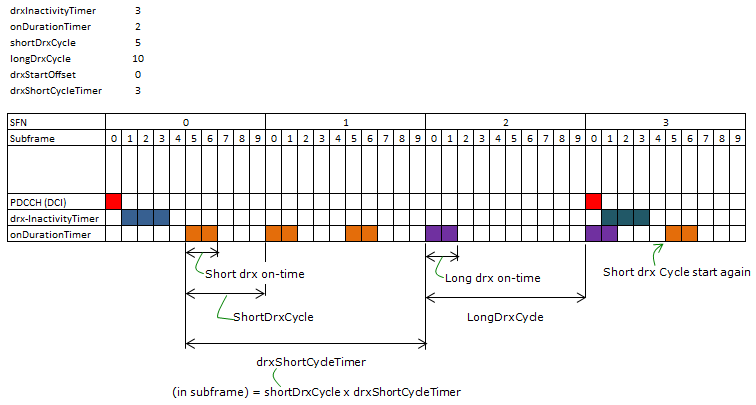
前文圖1已經提到,一個DRX周期等於UE喚醒時間(ON-duration)和睡眠時間的總和。在LTE裏,系統可以根據不同的業務場景,給UE分別配置短周期(short DRX cycle)或者長周期(long DRX cycle)。比如在進行VOIP業務時,語音編解碼器通常20ms發送一個VOIP包,那麽就可以配置長度為20ms的DRX短周期,而在語音通話期間較長的靜默期,就可以配置DRX長周期。如果同時配置了短周期和長周期,且在drxShortCycleTimer個子幀內都沒有監測到下行PDCCH,那麽UE將進入一次長周期睡眠,如下圖5所示。
(圖5)
在圖5中,我們還可以發現有個drxStartOffset參數,這個參數的含義是DRX周期是從哪個子幀開始的,比如周期是10個子幀,那麽drxStartOffset的範圍就是0~9;而如果周期是20個子幀,那麽drxStartOffset的範圍就是0~19,有點類似測量GAP裏的gapOffset。
6.參數配置
前面已經介紹了與DRX相關的很多參數,包括on_duration時長、drx-Inactivity定時器、長短周期、drxShortCycleTimer、drxStartOffset等等,可能有些同學已經迫不及待的想知道怎麽獲取這些參數以及這些參數的範圍是怎麽樣的了,下面就說說這個。
同樣的,這些參數仍然由RRC配置,具體在消息 RRCConnectionSetup 或 RRCConnectionReconfiguration 或 RRCConnectionReestablishment 的
 RadioResourceConfigDedicated 信元的 MAC-MainConfig 中,如圖6所示。
(圖6)
onDurationTimer:該參數表示在一個DRX周期裏,UE睡醒後的在線時長。以PDCCH子幀個數為基本單位,比如psf6表示UE在線監測的時長為6個PDCCH子幀。
drx-InactivityTimer:該參數表示當UE成功解碼到一個下行PDCCH之後,還需要繼續監測多少個PDCCH子幀。同樣以PDCCH子幀個數為基本單位,比如psf80表示UE還需要繼續監測80個下行PDCCH子幀才能進入睡眠態。
drx-RetransmissionTimer:這個參數用在下行重傳的場景,表示UE為了接收期望的下行重傳數據,需要連續監測的最大PDCCH子幀個數。同樣以PDCCH子幀個數為基本單位,比如psf8表示UE為了接收下行重傳數據,還需要繼續等待最多8個下行PDCCH子幀。因為下行重傳是自適應的,時間並不確定,如果UE發現eNB需要進行一次重傳,那麽就需要等待一段時間,這個時間就由這個參數來控制。在定時器運行的這段時間內,UE也是需要盲檢測PDCCH信道的。
longDRX-CycleStartOffset:這個參數可以同時表示 longDRX-Cycle 和 drxStartOffset 這兩層含義,以子幀為單位。比如長周期選擇sf1280,偏移選擇0。但需要註意的是,如果網側同時也配置了短周期(ShortDrx-Cycle)參數,那麽長周期必須配置成短周期的整數倍。比如短周期配置的是sf64(64個子幀),那麽長周期就不能配置sf80,因為80不能整除64。
shortDRX-Cycle:這個參數表示DRX采用的短周期時長,以子幀為單位,sf5表示短周期時長(含on-duration時間)為5個子幀。
drxShortCycleTimer:這個參數表示在短周期內持續多少個子幀沒有收到PDCCH就進入長周期。如果值為2,則表示持續(2×shortDRX-Cycle)個子幀沒有成功解碼到PDCCH就進入長周期。
也就是說:與定時器相關的參數都是以PDCCH子幀為單位的,而與周期相關的都是以子幀為單位的。
一個典型的長短周期DRX流程如圖7所示。具體流程為:UE在時刻(0,0)成功解碼到一個PDCCH子幀,因此開啟了drx-inactivity定時器(3個子幀的長度);到了時刻(0,5),滿足了進入短周期的時間條件(後文會介紹這個條件,這裏記為條件1),UE被喚醒進入on-duration(持續2個子幀);在時刻(1,0)和(1,5)多次進入短周期;到了(2,0)時刻,(drxShortCycleTimer×shortDrxCycle)=15個子幀內沒有成功解碼到PDCCH子幀,且滿足長周期進入條件(這裏先記為條件2,後文再介紹這個條件),UE進入長DRX周期,時刻(2,9)結束長周期;UE在(3,0)收到PDCCH子幀,因此重新啟動了drx-inactivity定時器。
(圖7)
再具體說說進入長短DRX周期的判斷條件。對於進入短周期的條件1,幀號SFN和子幀號subframeNumber需要滿足:
[(SFN *10) + subframeNumber] modulo (shortDRX-Cycle) = (drxStartOffset) modulo (shortDRX-Cycle)  (條件1)
對照圖7的例子,shortDrx-Cycle=5,drxStartOffset=0,因此時刻(0,5)、(1,0)、(1,5)都是滿足條件1的。對於進入長周期的條件2,幀號SFN和子幀號subframeNumber需要滿足:
 [(SFN * 10) + subframeNumber] modulo (longDRX-Cycle) = drxStartOffset   (條件2)
對照圖7的例子,longDrx-Cycle=10,drxStartOffset=0,因此時刻(1,0)、(2,0)、(3,0)都是滿足條件2的。我們可以看到,時刻(1,0)同時滿足了短周期和長周期的條件,但為什麽此時需要執行短周期DRX呢?下文會對這個地方做出解釋。
7.HARQ RTT Timer
在DRX機制中,還需要用到一個名為“HARQ RTT Timer”的定時器,這個定時器或者說這個參數,也是與下行重傳相關的。它的含義是,UE在收到期望的下行重傳數據之前,需要等待的最少子幀個數。HARQ RTT Timer 和 drx-RetransmissionTimer 的關系,後文介紹DRX具體流程的時候會提到。
對於FDD-LTE來說,HARQ RTT Timer的值固定等於8個子幀。對於TDD-LTE來說,HARQ RTT Timer的值等於(k+4)個子幀,k表示下行PDSCH傳輸與其應答ACK的時延,具體值如下圖8所示。比如當前是上下行子幀配置1,PDSCH是在9號子幀下發的,那麽eNB將在3號子幀接收應答,所以k=4。
(圖8)
8.DRX處理流程
前文已經提到,當UE處於on-duration時期,或者drx-InactivityTimer正在運行,或者drx-RetransmissionTimer正在運行,那麽UE都需要持續的監測下行PDCCH信道(即UE處於激活時間)。除了這些情況之外,當以下條件之一發生時,UE也需要持續的監測PDCCH信道:
(1)沖突解決定時器mac-ContentionResolutionTimer正在運行。
(2)有準備在PUCCH上發送的SR。
(3)上行HARQ重傳的授權已經存在,且對應的HARQ緩存裏有數據。

(4)非競爭隨機接入過程成功收到RAR響應之後,還沒有收到以CRNTI加擾的、指示有新數據的PDCCH。關於非競爭接入過程請參考《LTE-TDD隨機接入過程(1)-目的和分類》。
DRX的處理流程需要考慮的場景比較多,如果用文字描述的話不太清晰,這裏我用流程圖的形式展示給大家,如下面的圖9所示(因為截圖的原因,所以盡量壓縮了空間排版)。
(圖9)
上面圖9中提到的半雙工FDD的概念,是2008年愛立信在深圳的一次3GPP會議中提出來的,初衷是允許UE在3.5GHz和小於860MHz的Band中,可以進入FDD半雙工的模式。但截至目前,還沒有聽說哪家手機芯片廠商支持LTE半雙工FDD的情況。
如果eNB配置了DRX功能,除了影響UE側檢測下行PDCCH子幀,還會影響UE側SRS/CQI/PMI/RI的發送,具體為:
(1)UE在非激活時間內,不發送SRS。
(2)如果上層配置了cqi-Mask,那麽onDuration定時器不在執行時,UE不應該在PUCCH中發送CQI/PMI/RI;否則,如果沒有配置cqi-Mask,那麽當UE在非激活時間內,不應在PUCCH中發送CQI/PMI/RI。從這點可以看出,如果當前是LTE-TDD制式,RRC在配置參數的時候,應該確保onDuration或激活時間內,至少有1個上行子幀用於發送SRS/CQI/PMI/RI參數。
cqi-Mask參數是限制UE是否僅在DRX周期的onDuration時間內發送CQI/PMI/RI的,由RRC消息配置,具體在 RRCConnectionReconfiguration 或 RRCConnectionReestablishment 或 RRCConnectionSetup 消息的 RadioResourceConfigDedicated -> PhysicalConfigDedicated -> CQI-ReportConfig 字段中。
除此之外,考慮到UE側的處理時延,如果UE在激活時間的最後4個子幀內檢測到一個標識上行或下行新傳的PDCCH子幀,那麽在接下來的4個子幀內,UE是可以不用在PUCCH中發送CQI/PMI/RI或傳輸SRS的;而如果UE是因為收到了Go-To-Sleep控制單元而退出激活時間,那麽UE也是可以選擇在接下來的4個子幀裏繼續在PUCCH中發送CQI/PMI/RI或傳輸SRS的。
需要留意的是,無論UE是否在監聽PDCCH子幀,都不影響UE發送或接收HARQ反饋。
參考文獻:
(1)3GPP TS 36.321 V9.6.0 (2012-03) Medium Access Control (MAC) protocol specification
(2)3GPP TS 36.300 V9.10.0 (2012-12) Overall description
(3)3GPP TS 36.331 V9.18.0 (2014-06) Radio Resource Control (RRC)
(4)http://www.sharetechnote.com
(5)<<4g broadband="" dvanced="" for="" lte="" mobile="">>
(6)http://people.cs.nctu.edu.tw/~yctseng/papers.pub/mobile93-drx-ieee-jetcas.pdf

CNW Homework


2019年5月23日 星期四

NMEA標準格式

Source http://annheilong.pixnet.net/blog/post/24919514-%E3%80%90%E9%9B%BB%E8%85%A6%E3%80%91nmea%E6%A8%99%E6%BA%96%E6%A0%BC%E5%BC%8F

大部份的GPS receiver都具被有美國國家海洋電子學會(National Marine Electronics Association,NMEA)所制定的標準規格,其制定了所有航海電子儀器間的通訊標準,包括了資料的格式及傳輸資料的通訊協定。

NMEA規格有0180、0182、0183等三種,NMEA-0183是架構在0180及0182的基礎上,增加了GPS receiver輸出的內容而完成的。在電子傳輸的實體界面上,NMEA-0183包括了NMEA-0180及NMEA-0182所定的RS232界面格式,而且又多增加了EIA-422的工業標準界面,在傳輸的資料內容方面,也比NMEA-0180及NMEA-0182來得多。目前廣泛使用的NMEA-0183的版本為Ver. 2.01。

NMEA格式所傳輸的資料為美國國家標準資訊交換碼(American Standard Code for Information Interchange,ASCII),以「句子(Sentence)」的方式傳輸資料,每一個句子以「$」為起始位置,而以16進位控制碼「13」、「10」為終止,及ASCII中的Carriage Return{CR}和Line Feed{LF}碼。

每一個句子的長度不一定,最長可達82個字元(Character),而句中的欄位(Field)以逗號「,」分格。第二、三個字元為傳輸設備的識別碼,如「GP」為GPS的接收儀;「LC」為Loran-C接收儀;「OM」為Omega Navigation接收儀。第四五六個字元為傳輸句子的名稱,如「RMC」為GPS建議的最小傳輸資料(Recommended Minimum Specific GPS/TRANSIT Data);「GGA」為GPS固定資料(Global Positioning System Fix Data)。

當衛星接收機定位後,便經由輸出管道開始傳送有效的定位資料。
◎ 這些資料包含如下:

1) 經度
2) 緯度
3) 定位完成代號
4) 採用有效的衛星顆數
5) 所用的衛星編號,及仰角,方向角,接收訊號強度。
6) 衛星方位角
7) 高度
8) 相對位移位移速度
9) 相對位移位移方向角度
10) 日期
11) UTC時間
12) DOP誤差參考值
13) 衛星狀態及接收狀態
NMEA-0183 輸出資訊表
NMEA 種類 說明
GGA 衛星定位資訊。
GLL 基本地理位置-經度及緯度
GSA GNSS DOP(誤差資訊)
GSV GNSS 天空範圍內的衛星
RMC 基本定位資訊(指已達到定位目的時)
VTG 相對位移方向及相對位移速度


GPS常用的NMEA數據資料格式介紹如下:

「GGA」=>GPS固定資料$--GGA,hhmmss.ss,llll.ll,a,yyyyy.yy,a,x,xx,x.x,x.x,M,x.x,M,x.x,xxxx*hh範例說明:
$GPGGA,055148,2407.8945,N,12041.7649,E,1,00,1.0,155.2,M,16.6,M,X.X,xxxx,*47

$GPGGA = Global Positioning System Fix Data 
1 055148 = UTC of Position [接收的時間(世界標準時),格式:時分秒] 
2 2407.8945 = Latitude [緯度,格式:度分.分], 
3 N = N or S[N指北半球(S指南半球)], 
4 12041.7649 = Longitude [經度,格式:度分.分] 
5 E = E or W [E指東半球(W指西半球)] 
6 1 = GPS quality indicator (0=invalid; 1=GPS fix; 2=Diff. GPS fix) [GPS等級,0:表示資料可用;1:非DGPS定位資料;2:DGPS定位資料], 
7 00 = Number of satellites in use [not those in view] [所使用之衛星數], 
8 1.0 = Horizontal dilution of position [平面精度指標(HDOP)], 
9 155.2 = Antenna altitude above/below mean sea level (geoid) [天線高度(平均海水面)], 
10 M = Meters (Antenna height unit) [單位(公尺)], 
11 16.6 = Geoidal separation (Diff. between WGS-84 earth ellipsoid and mean sea level. -=geoid is below WGS-84 ellipsoid) [大地起伏值], 
12 M = Meters (Units of geoidal separation) [單位(公尺)], 
13 X.X = Age in seconds since last update from diff. reference station [差分GPS數據期], 
14 xxxx = Diff. reference station ID# [基站站號0000-1023], 
15 *47 = Checksum (檢查位元)
「RMC」=>GPS建議最小傳輸資料$--RMC,hhmmss.ss,A,llll.ll,a,yyyyy.yy,a,x.x,x.x,xxxxxx,x.x,a*hh
($GPRMC,<1>,<2>,<3>,<4>,<5>,<6>,<7>,<8>,<9>,<10>,<11>)
範例說明:
$GPRMC,055148,A,2407.8945,N,12041.7649,E,000.0,000.0,061196,003.1,W*69
1) $GPRMC,055148 接收定位時間(UTC time)格式:時時分分秒秒.秒秒秒(hhmmss.sss)。
2) A = 定位狀態,A:資料可用,V:資料不可用。
3) 2407.8945 = 緯度,格式:度度分分.分分分分(ddmm.mmmm)。
4) N = 緯度區分,北半球(N)或南半球(S)。
5) 12041.7649 = 經度,格式:度度分分.分分分分。
6) E = 經度區分,東(E)半球或西(W)半球。
7) 000.0 = 相對航行速度, 0.0 至 1851.8 knots(節)
8) 000.0 = 相對航行方向,000.0 至 359.9度。實際值。
9) 061196 = 日期,格式:日日月月年年(ddmmyy)。
10) 003.1 = 磁極變量,000.0 至180.0度。
11) W = 磁方位角(西W或東E)度數。
12) *hh = Checksum.(檢查位元)


「GSA」=>GPS幾何精度因子 偏差資訊(GNSS DOP)及衛星狀態(GSA) 
$--GSA,a,x,xx,xx,xx,xx,xx,xx,xx,xx,xx,xx,xx,xx,x.x,x.x,x.x,*hh
($GPGSA,<1>,<2>,<3>,<3>,,,,,<3>,<3>,<3>,<4>,<5>,<6>,<7>) 

範例說明:
$GPGSA,A,3,01,05,09,17,21,2,26,39,,,,1.9,1.0,1.7,*33
$GPGSA,
1) A = 定位模式,M:手動模式;A:自動模式
2) 3 = 定位模式,1:位置不可用;2:二度空間定位;3:三度空間定位
3) 01,05,09,17,21,2,26,39,,, = 接收衛星編號 (PRN)
4) 1.9 = PDOP-位置精度稀釋 0.5 至 99.9.
5) 1.0 = HDOP-水平精度稀釋 0.5 to 99.9.
6) 1.7 = VDOP-垂直精度稀釋 0.5 to 99.9.
7) *33 = Checksum.(檢查位元).

「GSV」=>可視衛星狀態
$--GSV,x,x,xx,xx,xx,xxx,xx,………,*h
($GPGSV, <1>,<2>,<3>,<4>,<5>,<6>,<7>,…<4>,<5>,<6>,<7>,<8> )
範例說明:
$GPGSV,3,1,09,01,27,299,43,………*70
1) 3 = 天空中收到訊號的衛星總數。
2) 1 = 定位的衛星總數。
3) 09 = 天空中的衛星總數,00 至 12。
4) 01 = 衛星編號, 01 至 32。
5) 27 = 衛星仰角, 00至 90 度。
6) 299 = 衛星方位角, 0 至 359 度。實際值。
7) 43 = 訊號雜訊比(C/No), 00 至 99 dB;無表未接收到訊號。
注意!第<4>,<5>,<6>,<7>項個別衛星會重複出現,每行最多有四顆衛星。其餘衛星資訊會於次一行出現,若未使用,這些欄位會空白。
8) Checksum.(檢查位元).

WGS-84


世界大地測量系統(英語:World Geodetic System, WGS)是一種用於地圖學、大地測量學和導航(包括全球定位系統)的大地測量系統標準。WGS包含一套地球的標準經緯坐標系、一個用於計算原始海拔數據的參考橢球體,和一套用以定義海平面高度的引力等勢面數據。
WGS的最新版本為WGS 84(也稱作WGS 1984、EPSG:4326),1984年定義、最後修訂於2004年。[1]之前的版本有WGS 72、WGS 66、WGS 60。全球定位系統使用的就是WGS 84參考系。
在Android系統內取得的海拔高度預設是參照WGS84而不是當地平均海平面,使得用戶在海邊定位是可能發現自己的測量值位於海平面以下。

WGS-84[編輯]

初版WGS84通過遍布世界的衛星觀測站觀測到的坐標建立,其精度為1-2m。1994年1月2日,通過10個觀測站在GPS測量方法上改正,得到了WGS84(G730),G表示由GPS測量得到,730表示為GPS時間第730個周。
1996年,National Imagery and Mapping Agency (NIMA) 為美國國防部 (U.S.Department of Defense, DoD)做了一個新的坐標系統。這樣實現了新的WGS版本WGS(G873)。其因為加入了美國海軍天文台和北京站的改正,其東部方向加入了31-39cm 的改正。所有的其他坐標都有在1公寸之內的修正。

GDOP,PDOP,HDOP,VDOP,TDOP

Source

 PDOP:位置精度因子(Position Dilution of Precision),直譯為“精度強弱度”,通常翻譯為“相對誤差”。具體含義是:由於觀測成果的好壞與被測量的人造衛星和接收儀間的幾何形狀有關且影響甚大,所以計算上述所引起的誤差量稱為精度的強弱度。天空中衛星分佈程度越好,定位精度越高(數值越小精度越高)。PDOP表示三維位置定位精度與導航臺幾何配置關係的一個引數。在全球定位(GPS)系統中,等於使用者位置的徑向誤差(1°)與使用者到衛星的距離測量誤差(1°)的比值。
           Pdop取值範圍為:0.5--99.9,為緯度、經度和高程等誤差平方和的開根號值,所以Pdop的平方 =Hdop 的平方 +Vdop 的平方。
           在幾何上,PDOP按由接收機和所能觀測到的四顆衛星的連線所組成的錐狀物的體積比例來平分1。對於好的定位而言,PDOP值小,例如3。比7大的值被認為是較差。因此,小的PDOP值與相隔較遠的衛星相關。
          在GPS導航和定位中,我們使用幾何精度因子(DOP,dilution of precision,也翻譯為精度衰減因子)來衡量觀測衛星的空間幾何分佈對定位精度的影響。DOP分為以下幾種:
           PDOP( position dilution of precision ) 三維位置精度因子:為緯度、經度和高程等誤差平方和的開根號值
          TDOP(time dilution of precision )鐘差精度因子:為接收儀內時表偏移誤差值。
           HDOP(horizontal dilution of precision )水平分量精度因子:為緯度和經度等誤差平方和的開根號值。
           VDOP(vertical dilution of precision )垂直分量精度因子
            DOP值的大小與GPS定位的誤差成正比,DOP值越大,定位誤差越大,定位的精度就低。PDOP則直接反映GPS衛星的分佈情況,當PDOP較大時,表明空中的4顆GPS衛星幾何分佈不是太理想,他們構成的圖形周長太短,定位精度就低,反之亦然。
             精度衰減因子(DOP)是位置質量的指示器。它是考慮每顆衛星相對於星座(幾何位置)中其它衛星的位置來預計用該星座能得到的位置精度的計算結果。小的DOP值表示強的衛星幾何位置和精度的較高概率。高的DOP值表示弱的衛星幾何位置和精度的較低概率.
           一個GPS接收器可以在同一時間得到許多顆衛星定位資訊,但在精密定位上,只要四顆衛星訊號即已足夠了,一個好的接收器便可判斷如何在這些衛星訊號當中去擷取較可靠的訊號來計算,如果接收器所選取的訊號當中,有二顆衛星距離甚近,二顆衛星訊號在角度較小的地方會有一個重疊的區域產生,隨著距離愈近,此區域便愈大,影響精度的誤差亦愈大。如果選取的衛星彼此相距有一段距離,則訊號相交之處便較為明確,誤差當然就縮減了不少。
           這也從另外一個方面說明,雖然我們正頭頂上的衛星訊號比較好,比較容易鎖定,但其實它們的作用卻不如角度比較低的衛星的。
它們之間的簡單關係為:
HDOP2+VDOP2=PDOP2
PDOP2+TDOP2=GDOP2 
            幾何精度因子(Geometric Dilution Precision ,縮寫為GDOP)是衡量定位精度的很重要的一個係數,它代表GPS 測距誤差造成的接收機與空間衛星間的距離向量放大因子。實際表徵參與定位解的從接收機至空間衛星的單位向量所勾勒的形體體積與GDOP成反比,故又稱為幾何精度因子。
            實際上,GDOP的數值越大,所代表的單位向量形體體積越小,即接收機至空間衛星的角度十分相似導致的結果,此時的GDOP會導致定位精度變差。好的GDOP, 是指其數值小,代表大的單位向量形體體積,導致高的定位精度。好的幾何因子實際上是指衛星在空間分佈不集中於一個區域,同時能在不同方位區域均勻分佈。